Work instructions created in minutes – rather than written in hours.
Film the process on your smartphone whilst explaining it – DE-instruct turns it into an illustrated, ready-to-use guide.
Try it for free
Work instructions created in minutes – rather than written in hours.
Hosting within the EEA
No AI training using your data
Weekly security scans
A product from DE software & control – a partner to industry for 29 years.
Customer installations worldwide
83
Customer installations worldwide
Workstations with operator assistance
11,000+
Workstations with operator assistance
Customer satisfaction
>98%
Customer satisfaction
Hosting within the EEA – Content and AI processing
EEA-Hosting
Hosting within the EEA – Content and AI processing
From video to clear documentation – it’s that simple

No more spending hours writing: a smartphone video in which you explain your process is all it takes.

Whether it’s training, internal procedures or customer guides – DE-instruct simplifies your knowledge management.
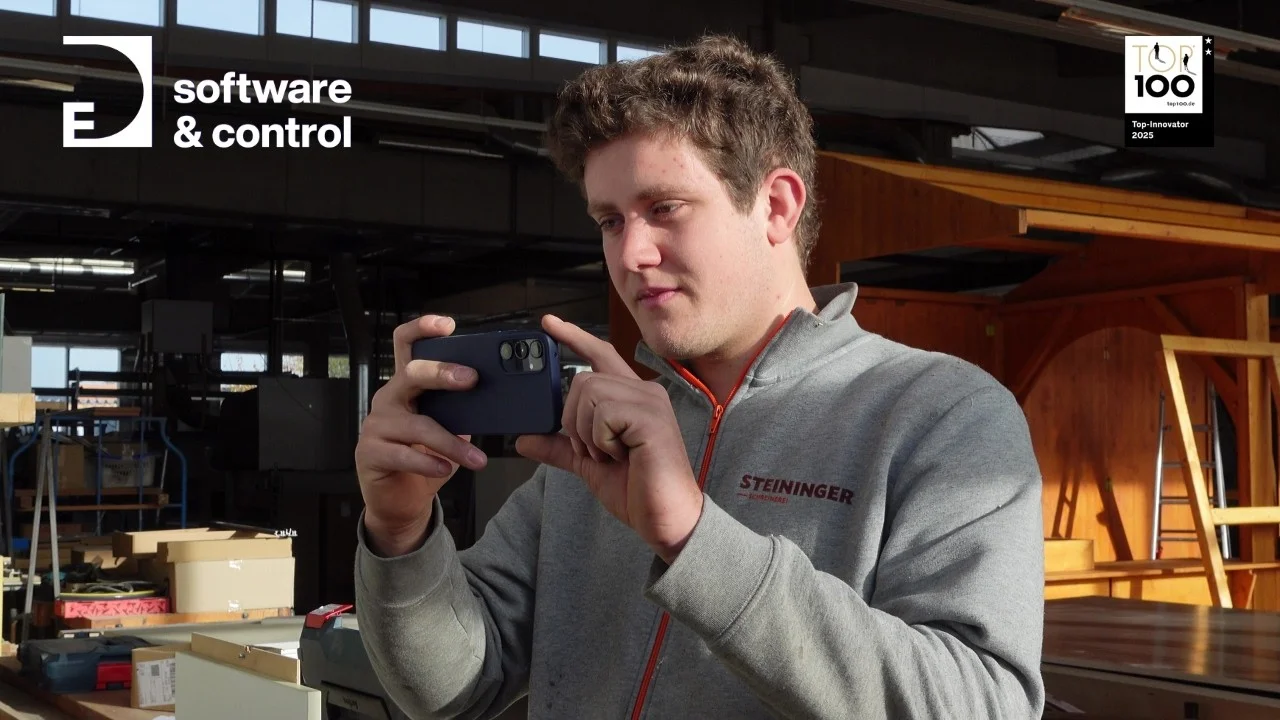
Capture. Convert. Deliver.

Fleeting expert knowledge is transformed into permanent documentation – in a matter of minutes, thanks to AI.

These instructions are based on this video
A real-life example from a joinery workshop: in goes a mobile phone video, out comes an illustrated guide.
Before: Raw video
uncut
workshop noises
spoken explanation
Afterwards: Work instructions within a few minutes
Fitting the drawer into the press fixture
Draft · v1.0.0

Tools: Vertical mounting jig, cordless screwdriver

Step 1
Step 1
Insert the side panels and align them with the stops.
Step 2
Step 2
Fit the base and back panel, and check the fitting.
Step 3
Step 3
Release the clamps; check the connections.
DE-instruct in action
Short clips on each function.
Upload a video – the AI will create an illustrated step-by-step guide.
Demonstration 1 / 5
Upload a video – the AI will create an illustrated step-by-step guide.
Define your own titles, steps, images/videos and checklists.
Demonstration 2 / 5
Define your own titles, steps, images/videos and checklists.
From ‘Draft’ to ‘Under review’ to ‘Approved’ – with PDF export.
Demonstration 3 / 5
From ‘Draft’ to ‘Under review’ to ‘Approved’ – with PDF export.
Find instructions and follow them step by step – with translations.
Demonstration 4 / 5
Find instructions and follow them step by step – with translations.
Every run is documented; logs can be exported.
Demonstration 5 / 5
Every run is documented; logs can be exported.
Where DE-instruct provides the best possible support
Wherever knowledge is stored in people’s minds rather than in documents.
Assembly & Work Instructions
Standards that everyone can understand – taken directly from the filmed process.
Induction & Onboarding
New staff members become independent more quickly.
Training & Instruction
Repeatable training sessions with documented completion.
Preserving knowledge
Practical knowledge persists – even after retirement.
Is your business experiencing a generational change? Find out more about our initiative
BoomerZ
More than just documentation
We don’t use AI as a gimmick, but as the foundation for your knowledge management.
AI-powered
AI-powered
The AI turns videos, PDFs, DOCX or TXT files into an illustrated draft.
Manual mode
Manual mode
Create your own steps, media, warnings, list of materials and checklists.
Versioning & Approval
Version history with rollback and two-stage approval.
Powerful editor
Powerful editor
Select still images from the video, annotate images, trim clips.
3 user roles
3 user roles
The Viewer executes tasks, the Editor creates content, and the Admin manages the team and file sharing.
Library
Library
All published guides with live search and PDF download.
Run
Run
Step by step, with checklists, translation and a chat assistant.
Tracking
Tracking
Each run is logged – PDF sent by email, export as PDF and CSV.
Film it once. Run it in any language.
Staff can read the instructions in their native language at the click of a button – you only need to maintain one version.
Any target language is possible
marked as machine translations
Costs are clear from the outset
from the Medium package
Deutsch
English
Polski
Română
Čeština
Türkçe
Українська
+ any other language
From the video straight to the workstation
Other tools stop at PDF. DE-instruct displays instructions directly within workstAItion 5.0 – tailored to the job, in the right place, at the right time.
1
Record a video
An expert films the process on their smartphone.
2 YOU ARE HERE
DE-instruct
The AI generates the content; you check it and approve it.
3
workstAItion 5.0
Approved instructions at the workstation, linked to the order and variant.
4
Feedback to your ERP/⁠MES
Each run is logged.
More on worker assistance
What DE-instruct delivers in measurable terms
Typical effects of video-based work instructions.
up to 90 %
faster creation of work instructions
up to 30 %
a shorter induction period for new staff
up to 60 %
fewer errors during execution
MES system at Rauch Möbelwerke
Over 35 assembly lines digitally networked – significantly fewer complaints and improved on-time delivery.
Read the Success Story
Ready to safeguard your company’s knowledge?

Discover just how simple knowledge management can be.

Fair and transparent prices
A monthly basic fee for features and storage, plus credits based on usage. No hidden costs.
Small
190 € / month*
Memory
5 GB
Work instructions
ca. 10

Minimum term: 12 months

  • Manual creation of work instructions
  • Video to work instructions (AI)
  • Export as PDF
  • Interface to workstAItion 5.0
  • PDF to work instruction (AI)
  • Defining checklists
  • Two-stage approval process
  • Carry out the work instructions
  • Enter checklist items
  • Ad hoc translation
Try it for free
LARGE
3.990 € / month*
Memory
300 GB
Work instructions
ca. 600

Minimum term: 12 months

  • Manual creation of work instructions
  • Video to work instructions (AI)
  • PDF to work instruction (AI)
  • Defining checklists
  • Two-stage approval process
  • Carry out the work instructions
  • Enter checklist items
  • Ad hoc translation
  • Export as PDF
  • Interface to workstAItion 5.0
Try it for free
Credit packages
For your information: Credits for usage-based AI actions, which can be added to any package.
Starter
99 €
600 Credits
PRO
You save 17 %
499 €
3.600 Credits
BUSINESS
You save 25 %
2.299 €
18.000 Credits
Contract & Terms and Conditions

Contract term: at least 12 months; payment monthly or annually in advance, by card (Stripe) or – once approved– by invoice. Upgrades can be made at any time; the difference will be charged for the full current month. Downgrades can be made on the first day of the month after the minimum contract term, provided that storage and documents fit within the smaller package.

Credits: Additional credits can be purchased as required.

End of contract: Read-only access; permanent deletion one month after the end of the contract. You are responsible for archiving your own data. The automatic PDF sent by email following each approval and checklist helps with this.

* Price adjustments in the event of increased platform and energy costs are possible with three months’ notice; in such cases, a special right of termination applies.

** Guide figure based on approximately 500 MB of media per work instruction.

All prices are exclusive of VAT. This offer is exclusively for businesses (Section 14 of the German Civil Code (BGB)) and public-law institutions. The price list (Version 4, June 2026), which forms part of the SaaS subscription contract, is binding.

Industrial-grade security
Your process expertise is your asset – which is why our security commitments form an integral part of the contract.
Hosting in the EEA
Hosting in the EEA
Hosting within the European Economic Area (EEA) – content and AI processing, encrypted and with daily backups.
No AI training
No AI training
Excluded by contract. Only relevant excerpts are sent to the AI – your content remains your property.
Continuous monitoring
Weekly vulnerability scans, critical vulnerabilities patched within 48 working hours, and confirmed data breaches reported within 48 hours.
Complete control
Complete control
Client segregation, role-based access rights, export at any time (EU Data Act) and complete deletion by administrators.
All commitments in detail
You won’t be starting on your own – a kick-off meeting and first work instruction are included.

Experts from DE software & control will support you right through to the first approved work instruction.

Try it for free
We’ll activate your trial account and support you right through to your first work instruction.
  • Trial access including demo work instructions
  • Personal contact at DE software & control
Requested in just two minutes
A short form – we’ll get back to you within two working days regarding your trial access.
Try it for free
FAQs
Everything you need to know about getting started, prices and safety
Can’t find your question here? We’d be happy to help.
Ask a question

For industrial and trade businesses wishing to create, translate and carry out work instructions digitally – exclusively for businesses (Section 14 of the German Civil Code (BGB)) and public-law bodies.

A smartphone and a web browser. Once you’ve registered, you can get started with the demo tutorials; you can request a free trial using the form.

AI analysis of videos (per second) and documents (per page), new editor steps, translations and checklists. You can view costs and credit balances before each step.

At least 12 months; payment monthly or annually in advance by card or invoice. Upgrades are possible at any time; downgrades are permitted at the end of the minimum contract period.

No. The AI provides the draft, but approval is always carried out by a human – from the Medium package onwards, this is a two-stage process involving a reviewer.

Hosting within the European Economic Area (EEA) – content and AI processing, encrypted. The platform is scanned weekly for vulnerabilities; the General Terms and Conditions of Business form an integral part of the contract.

No, that is excluded under the terms of the contract. Your content remains your property.

At any time: manuals and logs as PDF files, log lists as CSV files – we also support switching providers in accordance with the EU Data Act. Important: Under the terms of the contract, you must regularly back up your work instructions externally.

Interface: German and English. You can translate the instructions into any language whilst carrying out the task (from the Medium package onwards).

Yes – the interface to our worker assistance system, workstAItion 5.0, is included in all packages. Further integrations, such as with ERP or MES systems, are available on request.

Yes – the kick-off session and first instruction are included. The AI converts PDF instructions from the Medium package onwards.

How do you film correctly for DE-instruct?
Eight tips for the best results.
Ask a question

Landscape orientation, shot slightly from above, so more details are visible.

Avoid shaking and sudden movements.

Do not film against the light – otherwise the footage will be unusable.

Make sure the work area is well lit so that equipment and parts are clearly visible.

It is best to set your smartphone to ‘Do Not Disturb’ beforehand.

Choose an environment that is as quiet as possible, or a quiet time of day.

Explain each step clearly and name the tools and materials.

Do not obstruct work areas with your body or machinery.